We use cookies to make your experience better. To comply with the new e-Privacy directive, we need to ask for your consent to set the cookies. Learn more.


Router Basics / Wireless BE
Wireless BE and WiFi 7, Explained for Real Buyers
Wireless BE refers to the WiFi 7 generation. The real value is not in chasing a spec sheet. It is in choosing a router that feels faster, cleaner, and more prepared for the way modern homes actually use the network.
Why WiFi 7 matters
More headroom
For faster broadband and busier networks
Better long-term buy
When replacing older WiFi hardware
Featured Wireless BE Routers
Start with the router path that matches your setup: an everyday WiFi 7 upgrade, more headroom for heavier homes, a premium performance build, or a portable travel-ready option.
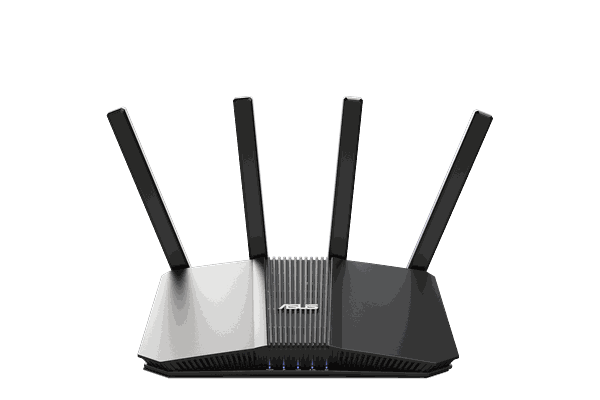
Everyday WiFi 7 pick
Asus RT-BE58U
A strong choice for households that want a modern WiFi 7 upgrade without jumping straight to the premium tier.
WiFi 7
Home use
VPN-ready
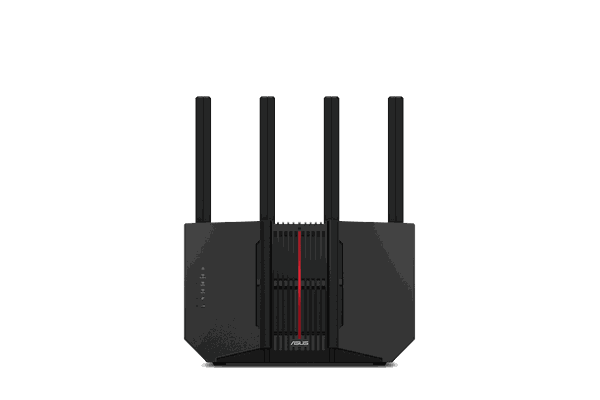
Performance upgrade
Asus RT-BE92U
A better fit for larger homes or heavier daily usage where more wireless headroom starts to matter faster.
WiFi 7
Higher tier
Busy households

Premium choice
GT-BE19000AI
Built for shoppers who want a more premium WiFi 7 foundation from the start and expect more from the rest of the network.
WiFi 7
Premium
Power users
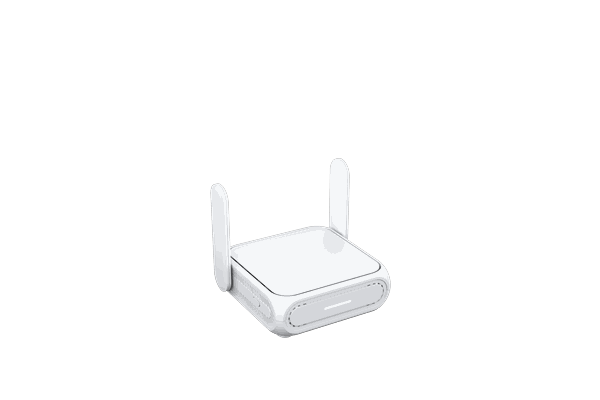
Portable option
BE58 Go
A flexible pick for users who want newer-generation hardware in a more compact, portable form factor.
WiFi 7
Portable
Travel-ready
Choose Your Wireless BE Path
WiFi 7 does not mean every buyer needs the same router. Start with the setup path that matches how and where you use your network.
Everyday upgrade
Home WiFi 7
Move beyond older ISP hardware with a current-generation router built for modern home use.
More headroom
Busy household
Better suited for larger homes, heavier streaming, gaming, and multi-device use.
Premium build
Performance WiFi 7
For buyers who want a higher-end router foundation from day one.
Portable setup
Travel WiFi 7
For users who want newer-generation wireless hardware in a more flexible form factor.
What is Wireless BE?
Wireless BE is the current naming associated with WiFi 7. In practical terms, it marks a newer class of wireless hardware designed to deliver more headroom, better efficiency, and a stronger overall network foundation for modern households.
1
More room to breathe
WiFi 7 is built for networks that need more capacity, especially when many devices are active at the same time.
2
Lower-latency potential
That matters most in households where streaming, gaming, video calls, and uploads all matter at once.
3
Stronger long-term value
If you tend to keep a router for years, moving into the current generation can be a smarter investment than buying into older WiFi late.
WiFi 6 vs WiFi 7 at a glance
WiFi 6 is still a solid fit for many homes. WiFi 7 becomes more compelling when you want more long-term headroom, heavier multi-device performance, and a cleaner path into current-generation hardware.
WiFi 6
Still a good fit for many homes
- Strong everyday performance for typical households
- Works well when device counts and speed demands are moderate
- Often the better fit if budget matters more than future-proofing
- Good for shoppers who upgraded more recently
WiFi 7 / Wireless BE
Better for heavier use and longer-term value
- More headroom for busy homes and faster internet plans
- Stronger fit for growing device counts and premium setups
- Better current-generation buy if you keep routers longer
- More appealing foundation for whole-home VPN use
Peak performance potential
WiFi 7 has the higher ceiling for newer hardware and heavier traffic.
Device density
WiFi 7 is the better long-term fit when more devices share the network.
Latency-sensitive use
WiFi 7 is more attractive for gaming, live calls, and higher-demand homes.
Coverage reality
Coverage still depends on router hardware, placement, and home layout, not just the WiFi generation alone.
Still comparing router paths?
Start with the featured WiFi 7 models, or compare VPN setup styles before choosing your router.
Why WiFi 7 feels different in the right home
The point of a newer router is not the acronym. It is how the network behaves when real life hits it: several people online, multiple devices active, smart TVs streaming, laptops uploading, and everything expecting instant response.
Where it makes the biggest impact
- Homes replacing aging ISP hardware or older WiFi generations
- Households with heavier streaming, gaming, and work-from-home overlap
- Faster broadband plans that deserve better local network hardware
- Premium setups that need to stay relevant for years, not months
Why buyers move to WiFi 7
- To avoid buying old technology right before another upgrade
- To create more margin for multi-device traffic and future device growth
- To build around better router-level performance from the start
- To make a cleaner long-term investment in the home network
Streaming households
Better suited to homes where TVs, tablets, phones, and smart devices are all active together.
Gamers and power users
More useful when responsiveness and consistency matter more than raw headline specs.
Whole-home VPN users
A stronger router gives encrypted traffic more breathing room across the rest of the network.
Long-horizon buyers
Ideal for shoppers who want a premium router now and fewer reasons to replace it soon.
Who should upgrade now?
Strong candidates
- Homes replacing older ISP hardware or aging WiFi gear
- Users with faster broadband and more connected devices than before
- Buyers who want better long-term value from a router purchase
- Households building around router-level VPN coverage
Reasonable to wait
- Small networks with modest speed demands
- Homes with few devices and no current performance pain points
- Shoppers focused only on lowest upfront cost
- Anyone who upgraded recently and is still satisfied with the current setup
Wireless BE and VPN routers
If you are planning to run VPN at the router level, starting with stronger hardware gives the rest of the network a better foundation. That does not make every VPN equally fast, but it does give whole-home coverage more room to perform well.
Why the pairing makes sense
- More capable hardware helps the network stay steadier under heavier loads
- Useful for homes protecting TVs, consoles, streaming devices, and laptops together
- Better fit for replacing weak ISP routers with something more capable and flexible
- Stronger starting point for a premium whole-home privacy setup
One realistic expectation
Wireless BE improves the network foundation. Final VPN performance still depends on router hardware, your internet plan, the VPN protocol, and the provider itself. The value is in creating more margin and a better overall experience across the home network.
Keep exploring
If you are comparing router technologies, these next guides can help narrow the right setup for your home and priorities.
If you already need a new router, buy into the current generation.
Wireless BE is at its best when it solves two problems at once: replacing aging hardware now and giving your network a stronger runway for what comes next. That is where WiFi 7 starts to feel like the right upgrade instead of just a newer label.
Wireless BE FAQ
Is Wireless BE the same as WiFi 7?
Yes. Wireless BE is the naming associated with WiFi 7 and the 802.11be standard. On shopping and product pages, it is essentially another way of signaling that the router belongs to the current WiFi 7 generation.
Do I need WiFi 7 right now?
Not always. WiFi 7 makes the most sense when you already need a router upgrade, want better long-term value, or are starting to feel the limits of older hardware. If your network is small and stable, WiFi 6 can still be perfectly reasonable. If your home is busier, your internet plan is faster, or you expect to keep your next router for years, WiFi 7 becomes a stronger buy.
Will older devices still work on a Wireless BE router?
Yes. Older devices can still connect to a Wireless BE router even if they do not take full advantage of the newest wireless standard. That is one reason upgrading can still make sense before every device in the home is current-generation.
Does WiFi 7 automatically mean better coverage?
Not by itself. Coverage still depends on router hardware quality, antenna design, placement, walls, floor plan, and interference in the home. WiFi 7 improves the overall foundation, but it does not override the physical realities of the space.
Why does Wireless BE make sense for VPN routers?
A more capable router gives whole-home VPN setups a stronger performance base, especially when multiple devices are connected at once. That does not guarantee identical VPN speeds across every provider or protocol, but it does give the network more breathing room and makes router-level protection easier to support well.
Who benefits most from upgrading?
The strongest candidates are busy households, users with faster broadband, heavier streaming or gaming habits, and buyers replacing older routers. It is also a good fit for shoppers who want to buy into the current generation instead of making another upgrade sooner than expected.

What Is Wi-Fi 7 (802.11be)? The Next Evolution in Wireless Networking.
In the ever-evolving landscape of wireless connectivity, the introduction of Wi-Fi 7 promises to be a game-changer, pushing the boundaries of speed, efficiency, and connectivity. As the successor to Wi-Fi 6, this cutting-edge technology is poised to revolutionize the way we experience the internet.
Speed Redefined
Wi-Fi 7, also known as 802.11be or Wireless BE, represents the latest advancement in wireless networking technology.
Building upon the foundations of Wi-Fi 6 and 6E, Wi-Fi 7 introduces significant improvements in speed, efficiency, and capacity, making it ideal for high-bandwidth applications and environments with numerous connected devices.
Enhanced Channel Width
With support for 320 MHz channels, Wi-Fi 7 doubles the channel width compared to Wi-Fi 6, allowing for more data to be transmitted simultaneously.
Improved Efficiency
One of the key features of Wi-Fi 7 is its enhanced efficiency in managing network traffic. By implementing more sophisticated methods for channel sharing and interference avoidance, Wi-Fi 7 aims to deliver a more reliable and stable connection even in crowded areas with numerous devices vying for bandwidth.
This improvement is crucial as the number of connected devices continues to grow in our increasingly connected world.
Enhanced Range and Coverage
Wi-Fi 7 is designed to provide better coverage and range compared to its predecessors.
This is particularly beneficial for larger spaces or areas with challenging signal propagation.
Advanced features like 1024-QAM and Orthogonal Frequency Division Multiple Access (OFDMA) enhance spectral efficiency, allowing more devices to communicate effectively.
With advancements in beamforming technology and the ability to intelligently adapt to different environments, users can expect a more consistent and reliable connection throughout their homes or workplaces.
Most Popular Wi-Fi 7 FlashRouters
-
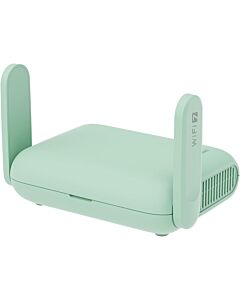 GL.iNet Beryl 7 – WiFi 7 Travel FlashRouter with VPNSpecial Price $199.99 Regular Price $279.99
 -
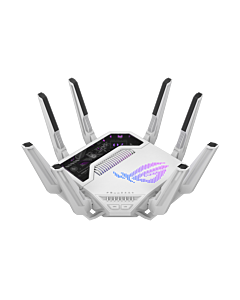 ASUS ROG Rapture GT-BE19000AI Wi-Fi 7, Dual 10G, AI Router by FlashRoutersSpecial Price $699.99 Regular Price $999.99

FlashRouters: Expertly Configured Wi-Fi 7 Solutions
FlashRouters offers a curated selection of Wi-Fi 7 routers, such as the Asus RT-BE88U, pre-installed with advanced firmware and VPN configurations. Our routers are designed to deliver optimal performance, security, and ease of use right out of the box.
VPN Compatibility: OpenVPN & WireGuard Support
Wi-Fi 7 routers from FlashRouters come pre-configured with support for leading VPN protocols, including OpenVPN and WireGuard. This ensures secure, encrypted connections for all your devices, safeguarding your online privacy and data.
Key Features of Wi-Fi 7
-
Wider Channel Support: The next generation of Wi-Fi offers support for three ultra-wide 320 MHz channels. Wi-Fi 7 doubles the bandwidth a channel could process as compared with Wi-Fi 6E (160 MHz). All three of them feature the 6 GHz band that was introduced with Wi-Fi 6E. Wider channels mean more data can be processed more quickly.
-
Improved Signal Density: QAM stands for Quadrature Amplitude Modulation. QAM represents the density of data that is broadcast over the network using radio-frequency waves. The higher the number, the more information is broadcast, as dead space between each device is reduced. Wi-Fi 7 supports 4K-QAM, compared to Wi-Fi 6/6E, which only supports 1096-QAM. In real terms, this increases speeds in the 320 MHz channel by 2.4 times.
-
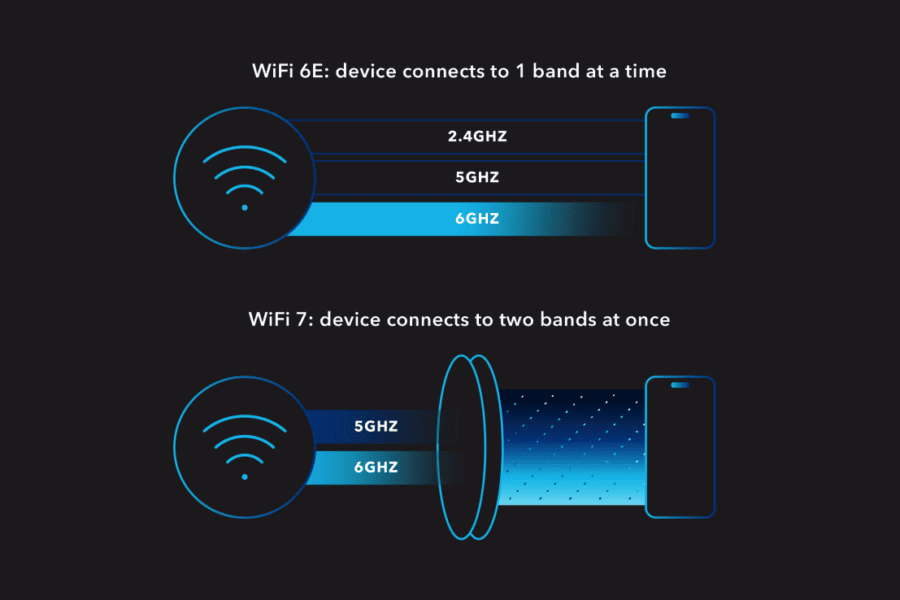
Multi-Link Operation (MLO): With every previous Wi-Fi standard, wireless devices could connect to only one band at a time. Wi-Fi 7 allows devices to connect to multiple wireless bands at the same time, so data is transferred more quickly. MLO is especially important if you’re moving between areas of your house or office. You can even pre-designate connection traffic based on specific devices. This is especially useful for devices with extremely high throughput usage.
-
Multi-Level Resource Units (RUs) & Puncturing: Officially called Multi-RU, this feature allows users to segment data usage within data channels. Previously, if one channel was being used by a device, other devices could not use that channel simultaneously. This meant that 160 MHz bands could not receive data, even if there was only one device using 40 MHz of that channel’s data. Wi-Fi 7 fixes that using a process called RU puncturing. RU-puncturing breaks the larger channels into more usable chunks. That means there’s less empty channel bandwidth, resulting in fasting processing speeds for you.